
Bhoomi RTC — Karnataka Land Records, Pahani & Mutation Online (2026)
Last Updated: July 13, 2026
If you are trying to access Karnataka land records online, this guide explains how to use the official Bhoomi RTC portal. Through this platform, you can access important property details such as RTC (Pahani), Mutation Status, Account Summary, and Revenue Maps online.— see the full list of benefits below.

We have prepared this guide to help you easily find and use these services if you are using the portal for the first time. Whether you are a landowner verifying your records, a buyer checking property details, or someone applying for a loan, this guide will help you access the information you need.
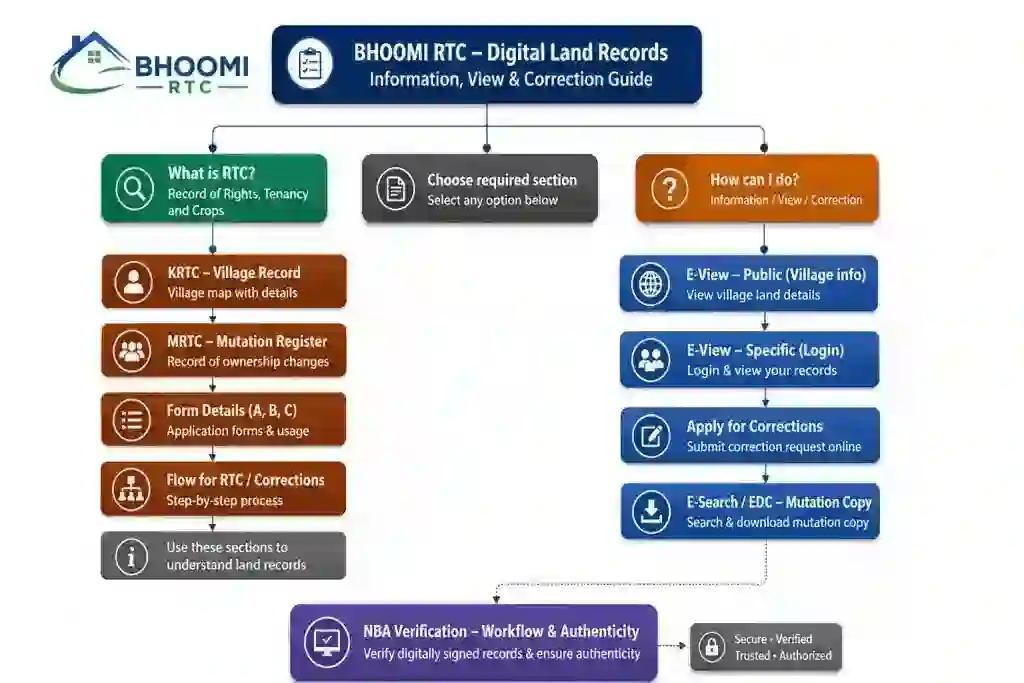
This guide has been reviewed using information available from the official Karnataka Bhoomi Portal and Revenue Department resources. Information is periodically updated to reflect the latest portal changes and services.
What is Bhoomi RTC Online ?
Bhoomi RTC Online (Record of Rights, Tenancy and Crops) is Karnataka’s official land record portal. It allows citizens to access important property information, such as RTC (Pahani), mutation status, and Mojini (land survey) records, all online — see Important Terms You Should Know for full definitions of each. This portal makes land records transparent, reliable, and easily accessible, without the need to visit any government office. The portal is commonly used for the following purposes:
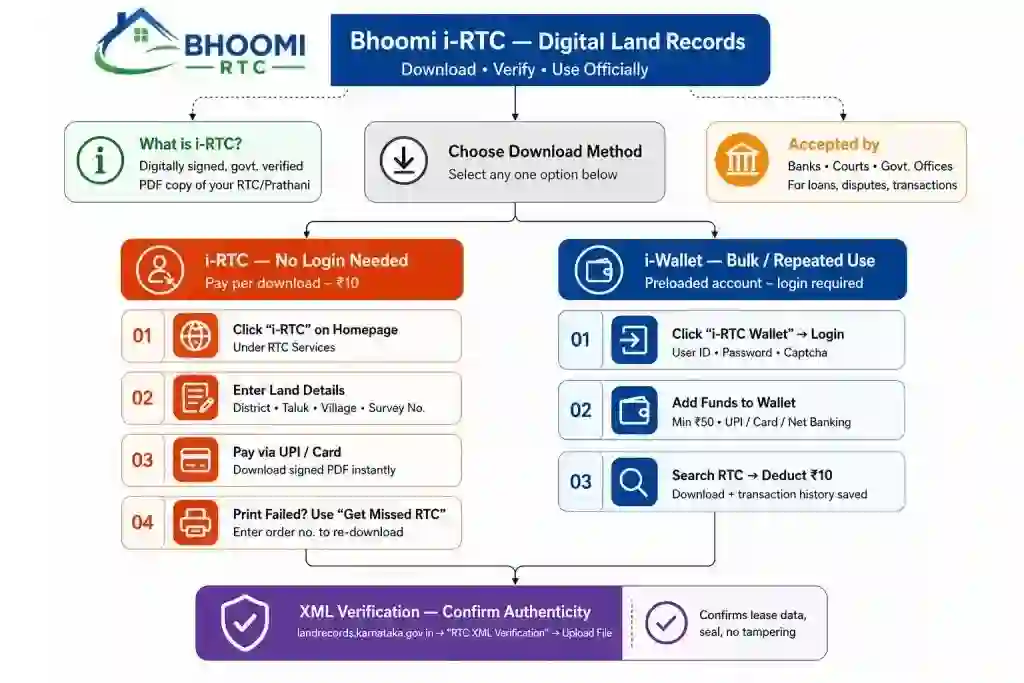
Key Information to Understand
| Feature | Details |
| Portal Name | Bhoomi RTC |
| Launched By | Government of Karnataka |
| Managed By | Revenue Department, Karnataka |
| Launch Year | 2000 (First digitized land records system in India) |
| Beneficiaries | Citizens & Farmers of Karnataka |
| Official Website | landrecords.karnataka.gov.in |
| Mobile App | Dishaank (for Survey Numbers) |
| Key Services | View RTC (Pahani), Mutation Status, Revenue Maps, Tippan |
| Mode of Access | Online & Offline (via Nadakacheri Centers) |
| Helpdesk/Contact | bhoomi@karnataka.gov.in |
Bhoomi Online Services
Karnataka Bhoomi RTC portal offers a variety of online services and tools to help landowners, buyers, and researchers easily manage land records. These services ensure transparency, reduce paperwork, and provide quick access to important property information.
The RTC portal provides a wide range of land-related services. Below is the complete list of available services:
| Service Name | Description |
| View RTC & Mutation Register (MR) | Check land records and mutation reports |
| i-RTC | Download Record of Rights (RTC) online |
| Survey Settlement | View land settlement details |
| Crop Loan Waiver | Check crop loan waiver status |
| Podi Service | Land subdivision (division of property) |
| Mutation History | Track ownership changes of land |
| Name Match Algorithm | Verify name matching in records |
| Aadhaar Seeding Report | Check Aadhaar linking status |
| Bagair Hukum | View unauthorized land usage details |
| Form 57 | Access the special land-related form |
| View Survey Document | View land survey documents |
| Request Survey Document | Apply for survey records |
| Dispute Cases | Check the land dispute case status |
| Disposal Ranking | View case resolution rankings |
| Land Beat Report | Access land inspection reports |
| Village Wise Pendency | Check pending cases by village |
| Bhoomi Tutorials | User guides and help resources |
| Parihara | Compensation-related services |
Property Calculators & Verification Tools
Helpful tools are provided to calculate land measurements, stamp duty, and verify property details.
Property Calculators & Tools
Stamp Duty | Land Area | EMI | Capital Gains | Rental Yield | Document Checklist
| Unit | Sq Feet |
|---|---|
| 1 Gunta | 1,089 |
| 1 Cent | 435.6 |
| 1 Bigha | 27,000 |
| 1 Acre | 43,560 |
| Year | Opening | Principal | Interest | Closing |
|---|
What Can You Do on Bhoomi RTC Online?
Important Terms You Should Know
Navigating land records is much easier once you understand the specific terminology used by the Revenue Department. These four terms form the foundation of almost every transaction on the Bhoomi portal.
RTC (Record of Rights, Tenancy and Crops)
Commonly called the Pahani, this is the most critical document for any landowner.
Mutation (MR – Mutation Register)
Mutation is the formal “editing” process of the land records.
Khata Extract
While often confused with the RTC, the Khata is primarily a document for taxation.
Survey Number
Think of the Survey Number as the “Aadhaar Card” for a piece of land.
Why These Terms Matter Together
When buying property, a smart buyer checks all four:
RTC vs. Khata vs. i-RTC vs. Mutation
| Document | Primary Purpose | Issued For | Legal Weight | Cost |
| RTC (Pahani) | Shows ownership, land extent, crop details | Rural agricultural land | Reference document | Free (view-only) |
| Khata | Property tax and municipal records | Urban properties (BBMP etc.) | Required for tax/building approvals | Varies by municipality |
| i-RTC | Digitally signed, legally valid RTC copy | Bank loans, court cases | Legally valid evidence | ₹10 |
| Mutation (MR) | Records transfer of ownership | Any ownership change (sale, gift, inheritance) | Confirms legal ownership update | Free to check status |
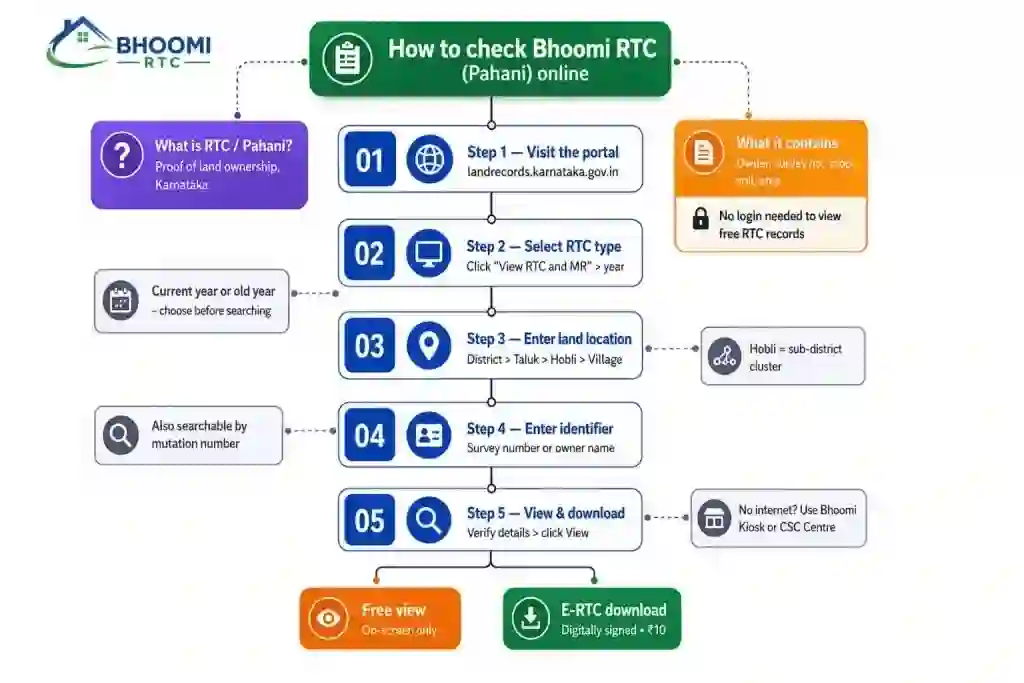
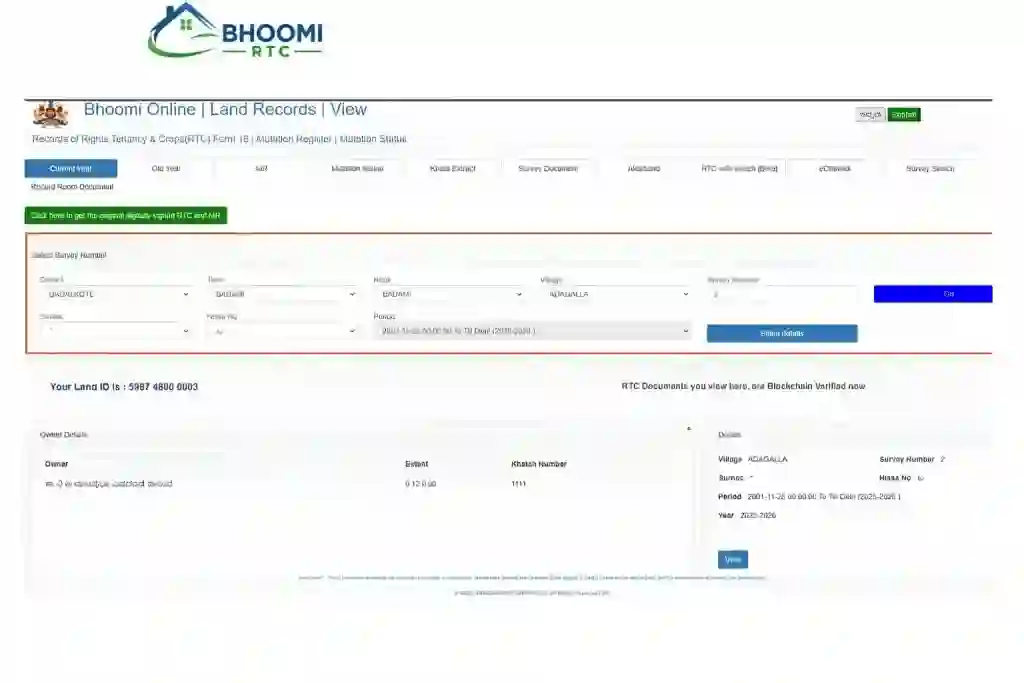
How to Check Bhoomi RTC (Pahani) Online
Checking your Bhoomi RTC (Pahani) online is a streamlined process designed by the Karnataka government to provide digitized land records. This guide simplifies the navigation to help you access your documents with minimal effort.
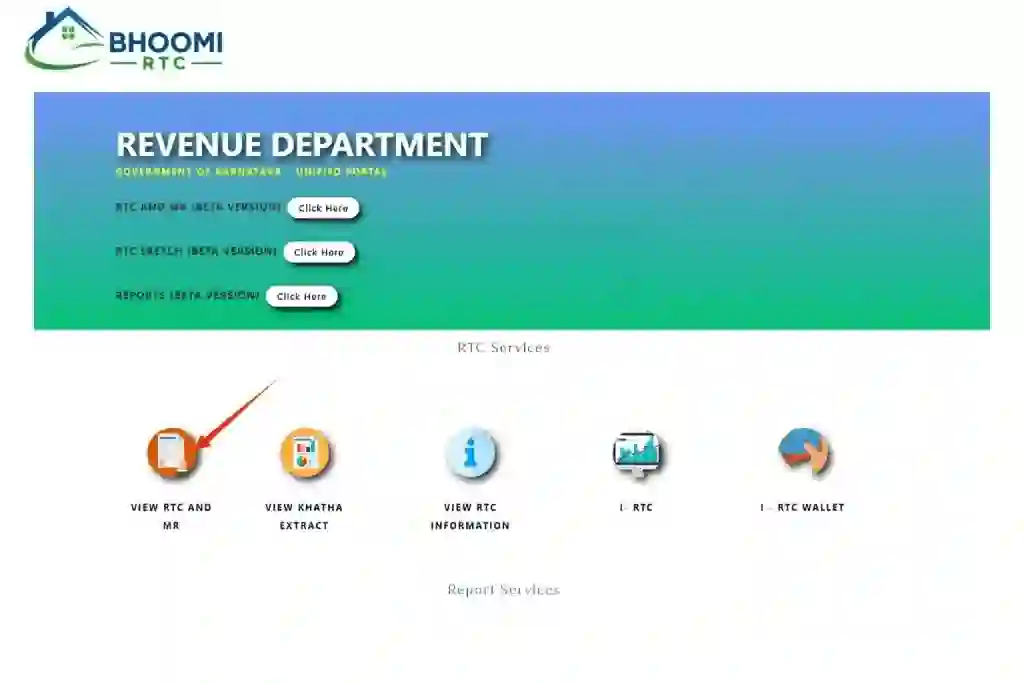
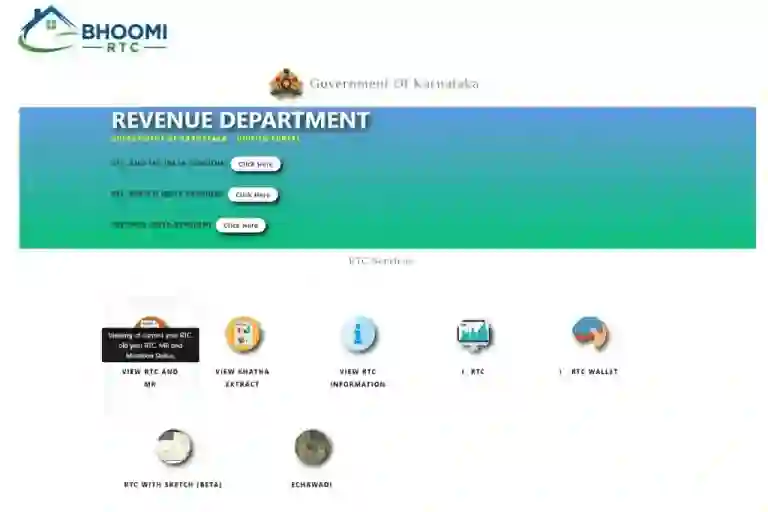
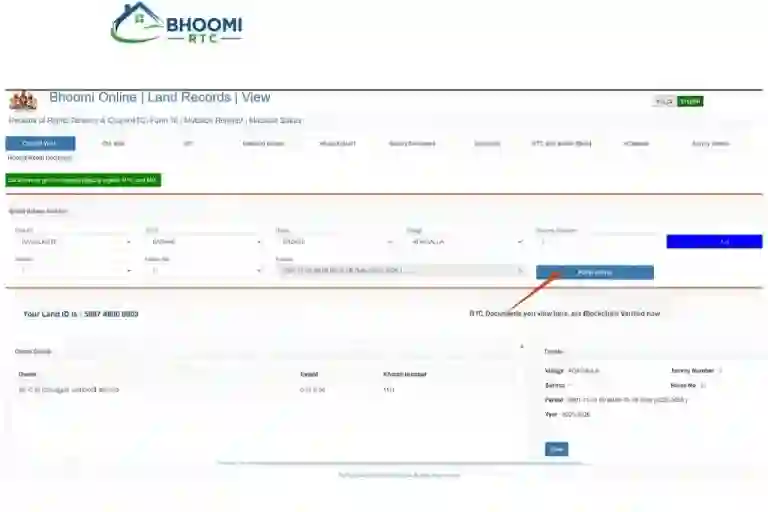
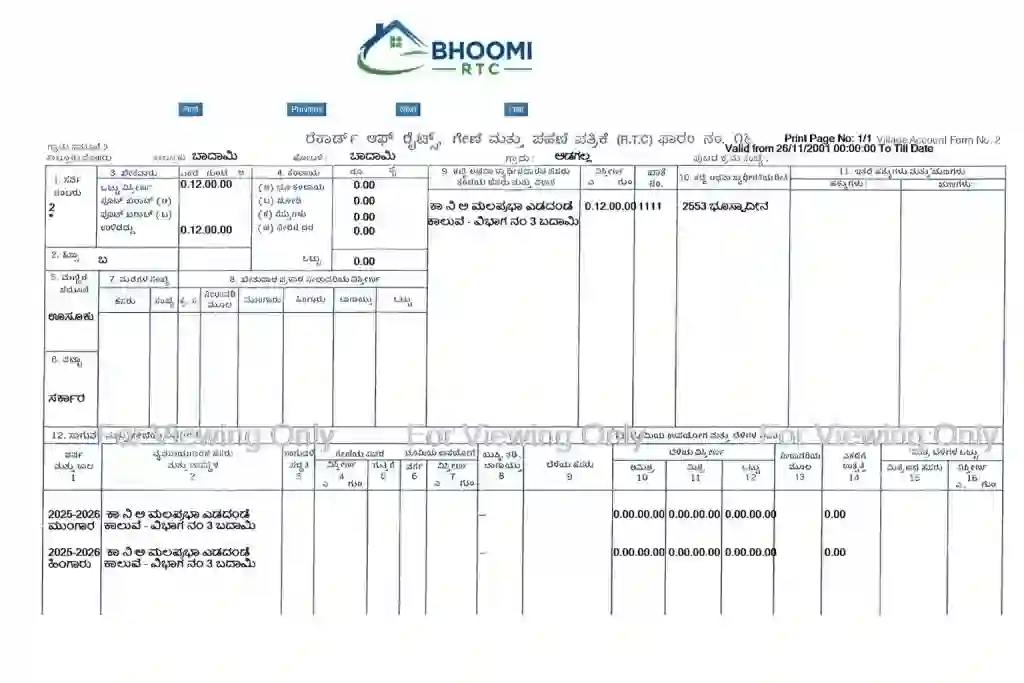
Step-by-Step Guide to Access Bhoomi RTC
How to Check Mutation Status
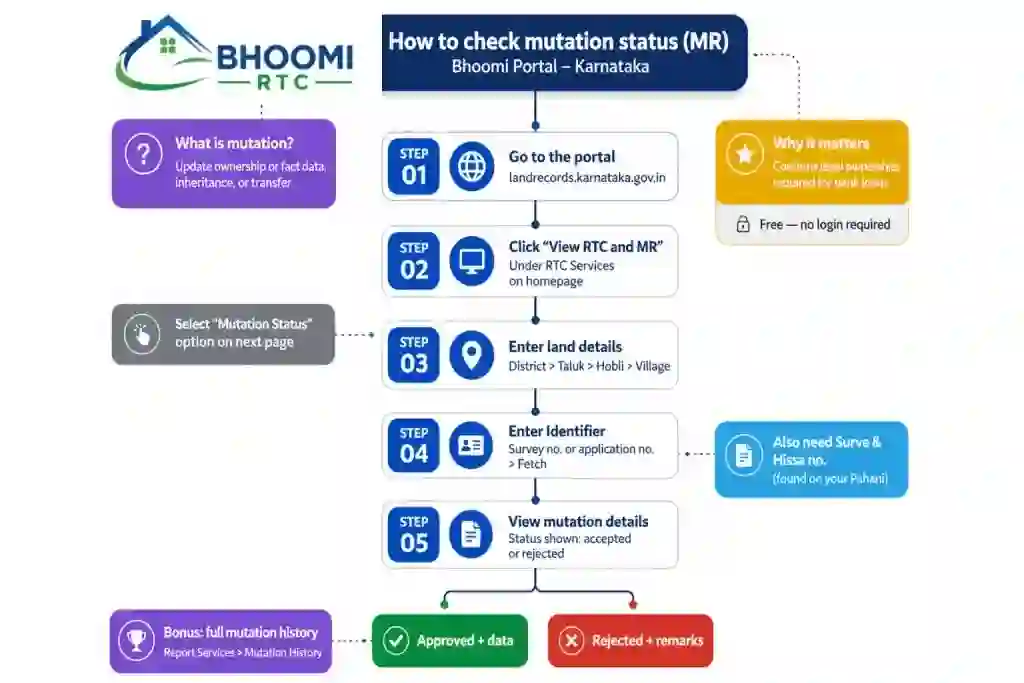
Mutation (MR) is the process of transferring the title of a property from one person to another. Checking the status of this request online ensures you stay updated on the legal ownership transition without visiting a government office. You may also find our Dishaank App guide helpful for viewing survey maps and locating land parcels.
Step-by-Step Guide to Check Mutation Status
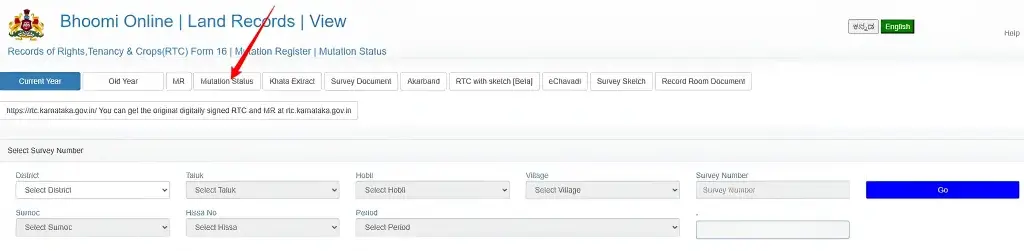
Step 1: Access the Mutation Services Section
Step 2: Select the search criteria
The portal generally offers two ways to find your record:
Step 3: Enter Location & Survey Details
Similar to the RTC process, select your District, Taluk, Hobli, and Village.
If searching by survey number:
- Enter the Survey Number.
- Select the Surnoc and Hissa Number.
- Click “Fetch Details.”
Step 4: View Mutation Details
A table will appear listing all mutation transactions associated with that land. Look for your specific MR Number. The system will display:
Understanding Mutation Status
| Status | Meaning |
| Pending | Still being processed or in the 30-day public notice period |
| Accepted | Mutation complete — new owner’s name is now in the RTC |
| Rejected | Declined due to document mismatch or legal dispute |
Why is tracking mutation status Necessary?
Bhoomi i-RTC (Digital Records)
The i-RTC (Internet Record of Rights, Tenancy, and Crops) is the officially recognized, digitally signed version of land records in Karnataka. Unlike the “view-only” version, the i-RTC carries legal weight for bank loans, court cases, and government applications.
i-RTC is a paid service provided by the Bhoomi RTC portal. While a standard “Pahani” is used for information, the i-RTC is an official document. It contains the digital signature of the authorized officer, ensuring that the data has not been tampered with and is current as per the government database.
Guide to Downloading and Verifying i-RTC
Step 1: How to Download Digitally Signed RTC To get your official copy, follow these steps:
- Login: Sign in to the Bhoomi Online Services portal using your registered citizen account.
- Select i-RTC Service: Click on the “i-RTC” tab on the dashboard then enter your land record details.
- Fetch & Pay: The portal will display the applicable fee before payment—see the Detailed Fee Breakdown for the current i-RTC charge
- Payment: Use the integrated payment gateway (UPI, Net Banking, or Debit Card).
- Download: Once the payment is successful, click “Download i-RTC.” The PDF will be generated with a digital signature.
The portal provides a specific tool to ensure the document you have is genuine and has not been altered:
Step 2: How to Verify XML RTC
- Validity: A digitally signed i-RTC does not require a physical seal or signature from the Village Accountant.
- Storage: Always save the original PDF file; printing and scanning it may make the embedded XML data harder to verify online.
- Wallet System: Frequent users can maintain a balance in the Bhoomi RTC Wallet to avoid making individual payments for each download.
How to Check Mojini Application Status
Important Reminders
The Mojini portal is the specialized system used by the Karnataka Government’s Department of Survey, Settlement, and Land Records. It is primarily used to track land survey requests, such as 11E sketches (for land sale/partition) and podi (land sub-division) applications.
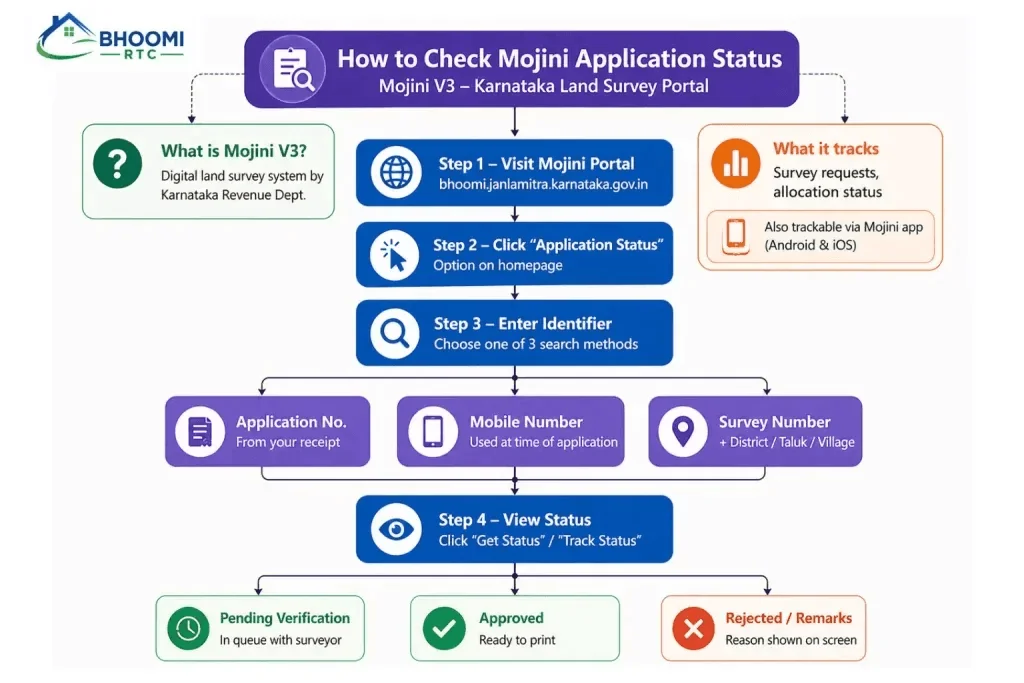
Step-by-Step Guide to Track Status
Step 1: Visit the Mojini V3 Portal
Step 2: Choose Your Tracking Method
The system provides three ways to retrieve your data. Select the one most convenient for you:
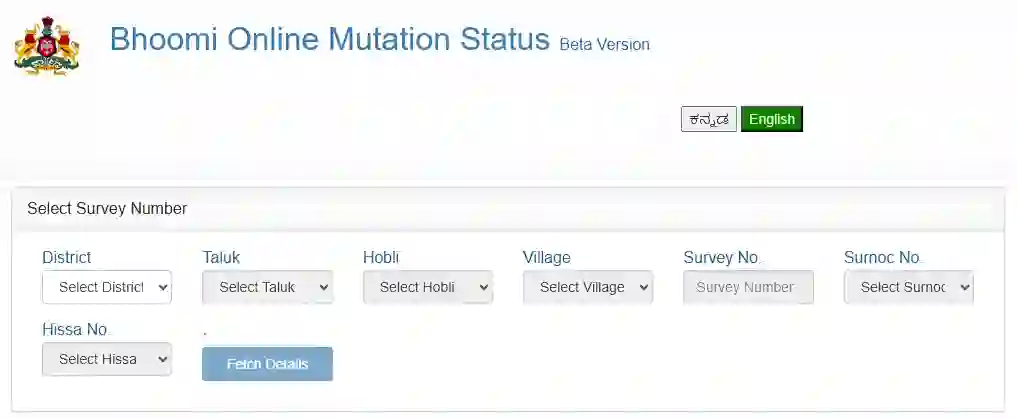
Step 3: Enter Land Details (If using Survey Number)
If you select the Survey Number option, you must provide the specific location details to filter the records:
- District, Taluk, Hobli, and Village.
- Survey Number (Surnoc).
- Hissa Number.
Step 4: Track and Review Status
Click on “Get Status” or “Fetch Details.” The system will display the current progress of your file. Key stages include:
Important Notes for Users
- Timeline: Most survey sketches take 15 to 30 days depending on the complexity and the specific office workload.
- Archived Section: If your application is old or already completed, check the “Archived” section of the portal to find historical survey records.
- Helpline: For technical issues or long delays, you can contact the Bhoomi monitoring cell at 080-22113255
Bhoomi RTC Login Process
While much of the Bhoomi portal can be accessed as a guest for viewing records, creating a dedicated account allows for personalized tracking, online payments for certified copies (i-RTC), and access to historical data.
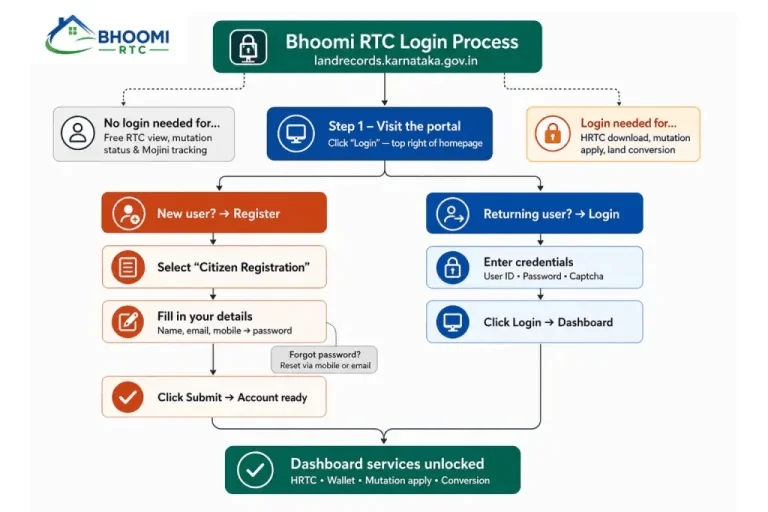
Step-by-Step Login & Registration Guide
Step 1: New User Registration
If you do not have an account, you must register to download digitally signed documents.
- Visit the Website: Navigate to the official Bhoomi portal and select “Create Account” or “Citizen Registration.”
- Enter Personal Info: Provide your Full Name, Aadhaar Number, and Address.
- Verification: Enter a valid 10-digit mobile number and email ID.
- OTP Authentication: Complete the registration by entering the OTP sent to your device. Create a strong password to finalize.
Step 2: Login with Credentials
Once registered, you can access the secure area of the portal:
- Select Login Type: Choose “Citizen Login” from the homepage.
- Input Details: Enter your registered Mobile Number/User ID and Password.
- Captcha: Solve the visual captcha code to verify you are not a bot.
- Security Check: For 2026, many services now require a Login OTP even after entering a password to enhance data security.
Step 3: Access Dashboard Services
Upon successful login, you are redirected to your personal dashboard. From here, you can access:
Pro-Tips for Login
- Guest Mode: If you only need to view the record and don’t need a formal printout, use the “Login as Guest” option.
- Session Timeout: For security, the portal will log you out after 15 minutes of inactivity.
- Browser Support: The portal is optimized for the latest versions of Chrome and Edge; ensure your pop-up blocker is disabled to view PDF documents.
How to Use the Dishank App for Survey Numbers
Dishank is the official mobile application by the Karnataka Government, integrated with the Bhoomi portal. It allows landowners to identify and verify their survey numbers directly in the field using GPS technology.
Key Benefits of Dishank App
How to Download and Use Dishank
Land Conversion & Survey Services
The Land Conversion and Survey Services (SSLR) modules on the Bhoomi portal are designed to handle physical changes to land use and boundary definitions. As of 2026, Karnataka has implemented “Deemed Conversion” rules to speed up the process for non-agricultural use.
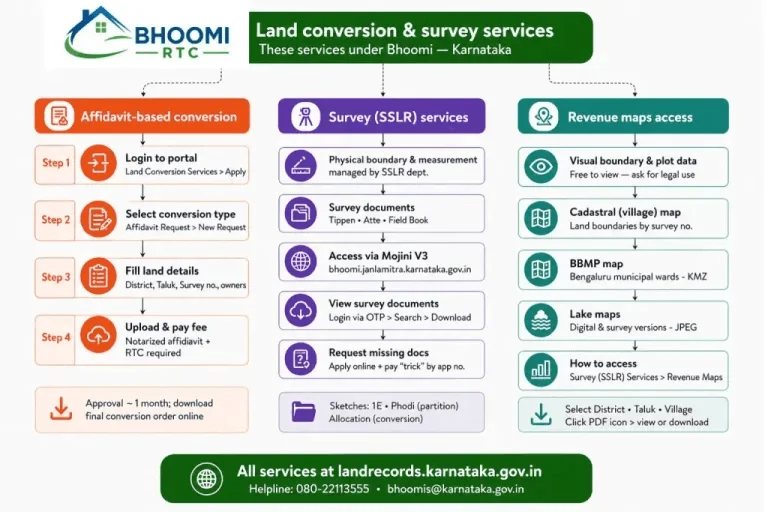
Land & Survey Services | Summary Table
| Service | Purpose | Key Requirement |
| Affidavit Conversion | Change land use (Agri to Non-Agri) | Notarized Affidavit (₹200 Stamp) |
| SSLR Services | Requesting land measurements/sketches | Application No. or Mobile No. |
| Revenue Maps | Viewing village/cadastral boundaries | District & Village selection |
| 5 Guntas Rule | Minimum size for conversion (2026) | Plot must be > 5 Guntas (approx. 5,445 sq ft) |
1. Affidavit-Based Land Conversion
This “Deemed Conversion” process eliminates the need for prior approval from multiple departments if the land falls within the Master Plan’s designated zones.
- Step 1: Verify Eligibility: Ensure the land is not in a restricted zone (Forest, Green Belt, or Lake Buffer).
- Step 2: Prepare the Affidavit: Draft a self-declaration on a ₹200 stamp paper, notarized by a registered Notary, stating that the land is free from encumbrances and fits the Master Plan.
- Step 3: Online Application: Upload the notarized affidavit, latest RTC, and Mutation MR copy to the Bhoomi Land Conversion portal.
- Step 4: Public Notice: A mandatory 30-day public notice period follows. If no objections arise, the Conversion Order is typically issued automatically (Deemed Approval).
2. Survey (SSLR) Services
The Commissioner of Survey Settlement and Land Records (SSLR) provides digital tools to request and track physical land surveys.
3. Accessing Revenue Maps
Revenue maps (also known as Cadastral Maps) show the exact boundaries of every survey number within a village.
- Navigate: On the Bhoomi homepage, click on “Revenue Maps” under the Survey Services tab.
- Selection: Choose your District, Taluk, Hobli, and Village.
- Map Type: Select “Cadastral Map” for standard boundaries or “Geo-Referenced Map” for a version that can be opened in Google Earth (KMZ format).
- Download: Click the PDF link for your village. You can zoom in to see how your survey number sits in relation to roads, lakes, and neighboring plots.
4. Critical 2026 Updates
Detailed Fee Breakdown | Bhoomi RTC
| Service | Purpose | Fee |
| i-RTC (Digitally Signed RTC/Pahani) | Official digitally signed RTC copy for legal and banking purposes | ₹10 |
| Mutation Status | View mutation application status | Free |
| Mutation Extract (Certified Copy) | Download certified mutation records | ₹15–₹20 |
| Village Revenue Map | Download village revenue map (PDF) | ₹30 |
| 11E Sketch / Mojini Survey | Survey, partition (Podi), and sketch services | ₹400–₹800* |
| Land Conversion | Conversion of agricultural land for other uses | Varies* |
Benefits of Bhoomi Online
The digitization of land records via the Bhoomi portal has transformed property management in Karnataka. By moving away from manual, paper-based systems, the state has created a more secure and accessible environment for landowners and potential buyers.
1. Extreme Time & Effort Savings
In the past, obtaining an RTC (Pahani) required traveling to a Taluk office and waiting in long queues.
2. Enhanced Transparency & Fraud Prevention
Digitization makes it nearly impossible to secretly alter land records.
3. Simplified Loan & Legal Processes
Financial institutions and courts now rely heavily on the Bhoomi database.
4. Easy Boundary & Crop Verification
Common Issues & Fixes
Technical systems can occasionally run into glitches. If you encounter issues while using the Bhoomi portal, use the following troubleshooting steps to resolve them quickly.
1. Login / OTP Problems
The Issue: You enter your mobile number, but the 6-digit OTP never arrives.
2. “Data Not Found” Error
The Issue: After entering the survey number, the system says “No Records Found.”
3. Incorrect Land Details (Name/Extent)
The Issue: Your name is misspelled, or the land area (extent) is shown incorrectly in the online RTC.
4. Payment & Download Issues
The Issue: Money was deducted from your account, but the PDF document did not download.
Need Help Accessing Your Bhoomi Records?
If these steps don’t work, contact the Bhoomi RTC Help Desk:
How To Access Bhoomi Services Offline -Nadakacheri Guide
For citizens who face difficulties using the online portal, the Karnataka Government has established Nadakacheri Centers (also called Nada Kacheri) across the state. These authorized service centers provide Bhoomi services in person.
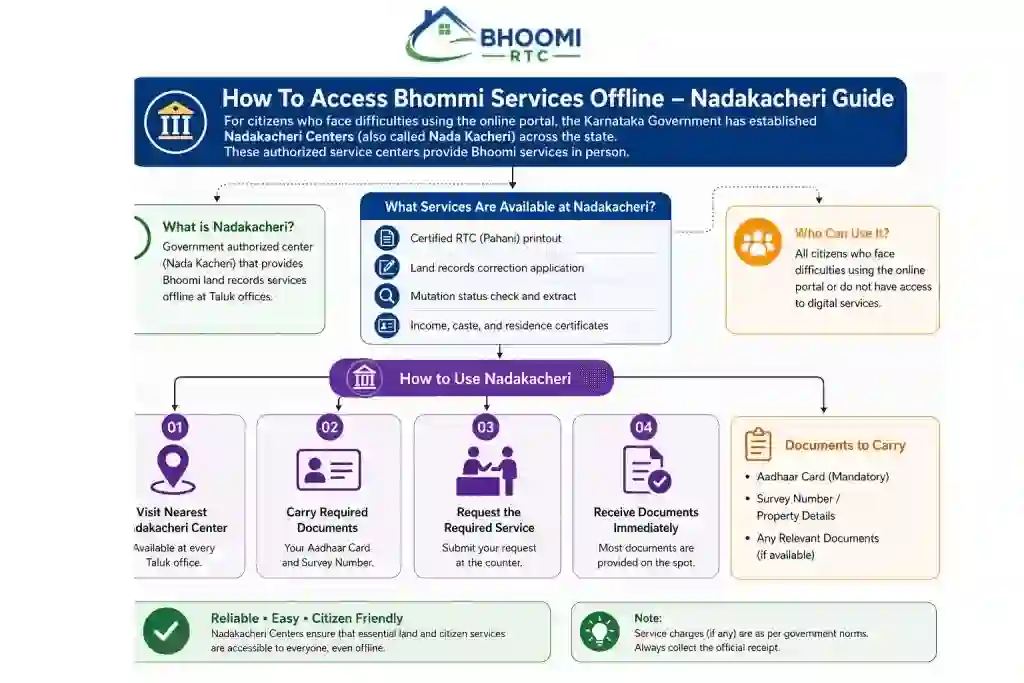
What Services Are Available at Nadakacheri?
How to Use Nadakacheri
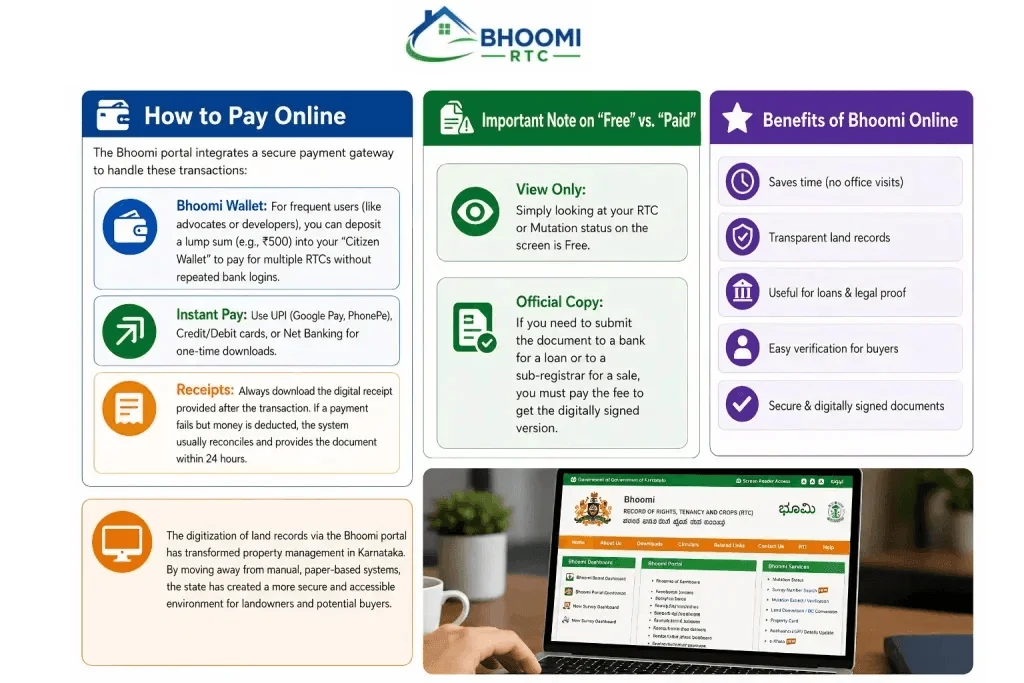
How to Pay Online
The Bhoomi portal integrates a secure payment gateway to handle these transactions:
- Bhoomi Wallet: For frequent users (like advocates or developers), you can deposit a lump sum (e.g., ₹500) into your “Citizen Wallet” to pay for multiple RTCs without repeated bank logins.
- Instant Pay: Use UPI (Google Pay, PhonePe), Credit/Debit cards, or Net Banking for one-time downloads.
- Receipts: Always download the digital receipt provided after the transaction. If a payment fails but money is deducted, the system usually reconciles and provides the document within 24 hours.
Frequently Asked Questions (FAQs)
Conclusion
Bhoomi RTC brings Karnataka’s land records fully online — RTC (Pahani), Mutation status, Khata Extract, Mojini survey tracking, and Revenue Maps are all a few clicks away instead of a Taluk office visit. If you’re new to the portal, check your RTC first to confirm ownership, then Mutation status if you’ve recently bought or inherited land, and review the Fees & Charges section before paying for any official digitally signed copy. This guide is reviewed periodically against the official Bhoomi Portal and updated as the Revenue Department rolls out changes.