
Dishaank App
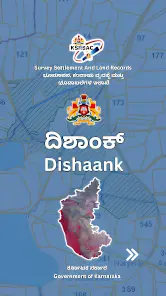
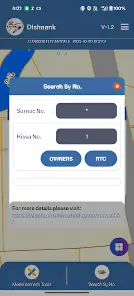
The Dishaank App is a digital land mapping application developed for Karnataka land-related services. It helps users access mapping data, survey details, and land location information through an interactive mobile platform.
The application has become useful for farmers, buyers, surveyors, and property owners who need quick access to land identification tools without depending entirely on offline survey records or repeated office visits.
What is Dishaank App?
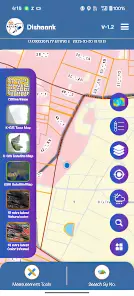
The Dishaank App is a GIS-based mapping platform that displays Karnataka survey data on digital maps. It allows users to explore land divisions, nearby plots, and cadastral layouts through satellite-supported visualization tools.
The platform is mainly used for understanding land positioning, checking surrounding survey areas, and improving transparency during land-related verification and property research.
Main Purpose of Dishaank App
The primary objective of the app is to improve transparency in Karnataka land verification processes. It allows users to access survey details without relying entirely on manual survey documents. Also visit Bhoomi rtc online
Key Features of Dishaank App
The Dishaank App includes several useful features that improve digital land verification and survey mapping.
GPS-Based Survey Number Detection
One of the most important features is live GPS survey detection. Users can identify nearby survey numbers based on their current location.
This feature is useful for:
- Farmers
- Property buyers
- Surveyors
- Real estate consultants
Bhoomi RTC Integration
The app allows users to connect survey information with Bhoomi RTC records for ownership verification.
Users can access:
- Owner details
- Land classification
- Mutation information
- Agricultural records
Village and Cadastral Maps
The application provides access to village-level cadastral maps that display:
- Survey divisions
- Plot boundaries
- Road access
- Water channels
- Government land areas
Satellite Map Visualization
Satellite layers help users compare actual land locations with survey boundaries. This improves accuracy during land verification.
Satellite mapping can help identify:
- Encroachments
- Boundary mismatches
- Access road issues
- Nearby land usage
Hissa Number Tracking
The app also supports hissa number identification for subdivided land parcels. This feature is useful in inheritance-based property divisions.
Offline Map Access
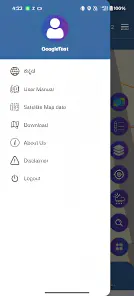
Some mapping data can be downloaded for offline use, making the app useful in rural locations with weak internet connectivity.
How Dishaank App Works
The application uses GPS technology, cadastral mapping systems, and Karnataka survey databases to display land-related information visually.
GPS-Based Land Identification
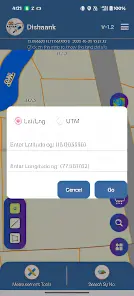
When location access is enabled, the app detects the user’s GPS coordinates and compares them with survey databases.
The system then displays:
- Nearby survey numbers
- Plot boundaries
- Village maps
- Adjacent survey land
Survey Boundary Mapping
The app overlays survey boundaries on digital maps, helping users identify land divisions accurately.
This feature improves:
- Property verification
- Boundary identification
- Land comparison
Bhoomi RTC Connectivity
The application also connects survey information with Bhoomi RTC data, helping users verify land ownership details.
Users can check:
- Owner name
- Land extent
- Crop details
- Mutation status
How to Download Dishaank App
Installing the app is simple for Android users.
Download Through Play Store
Follow these steps:
- Open Google Play Store
- Search for “Dishaank App”
- Select the official application
- Tap Install
- Allow required permissions
- Open the app
Important Installation Requirements
For smooth performance, users should ensure:
- GPS is enabled
- Stable internet connection is available
- Android device is updated
- Sufficient storage space exists
Should You Download APK Files?
Many websites provide APK versions of the app, but downloading unofficial APK files is risky.
Unofficial applications may:
- Contain malware
- Compromise privacy
- Display incorrect data
Always prefer official installation sources.
How to Set Up Dishaank App
After installation, users must configure the app properly for accurate survey detection.
Enable GPS Permissions
The app requires location access for live survey mapping. To improve accuracy:
- Enable high-accuracy GPS mode
- Allow location permissions
- Keep mobile internet active
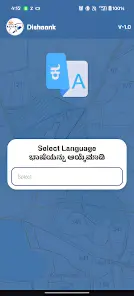
Select Language Settings
The application supports:
- English
- Kannada
Users can choose their preferred language from settings.
How to Search Survey Number in Dishaank App
Survey number identification is one of the most valuable features of the app.
Search Survey Number Using GPS
Users can locate nearby survey numbers through live GPS tracking.
Steps to Search Survey Number
- Open the Dishaank App
- Turn on GPS
- Tap Current Location
- Wait for the map to load
- Nearby survey numbers will appear automatically
This method is highly useful during physical land inspections.
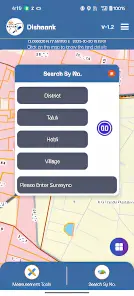
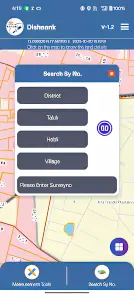
Search by District and Village
Users can also manually search survey details by entering:
- District
- Taluk
- Hobli
- Village
- Survey number
This option is useful when GPS signals are weak.
View Land Boundaries
After selecting a survey number, the app displays:
- Boundary lines
- Plot shape
- Neighboring land
- Access roads
This improves land verification before property transactions.
How to Check Bhoomi RTC in Dishaank App
RTC verification is an important step before purchasing land in Karnataka.
Open RTC Information
Users can access RTC records through linked survey data.
Steps to Check RTC
- Open the survey map
- Select the survey number
- Tap RTC option
- View ownership details
Information Available in RTC Records
RTC records generally contain:
- Owner name
- Father name
- Land size
- Land type
- Crop details
- Mutation status
Why Mutation Verification Matters
Mutation records confirm ownership transfers. Buyers should always verify whether the mutation status is updated before purchasing land.
This helps avoid:
- Ownership disputes
- Fraudulent transactions
- Pending land claims
Benefits of Using Dishaank App
The Dishaank App offers several benefits for Karnataka land verification.
Faster Property Verification
Traditional verification methods often require multiple office visits. The app simplifies the process digitally.
Better Transparency
Users can compare:
- GPS location
- Survey maps
- RTC details
- Village divisions
This improves confidence during land transactions.
Useful for Farmers
Farmers can use the app to identify:
- Agricultural land
- Water channels
- Nearby plots
- Access roads
Helps Reduce Property Fraud
Visual survey verification helps users identify mismatched land claims and suspicious property details before making payments.
Common Problems in Dishaank App and Solutions
Some users experience technical issues while using the app.
GPS Not Working Properly
This issue may occur because:
- GPS is disabled
- Weak signal strength
- Low location accuracy
Solution
- Enable high-accuracy mode
- Restart GPS
- Move to an open area
Survey Number Not Showing
Sometimes survey data may not load properly.
Solution
- Refresh the map
- Restart the application
- Clear app cache
- Try manual search
App Crashing Frequently
Low-memory devices may face performance problems.
Solution
- Update the app
- Close background applications
- Restart the device
RTC Page Not Loading
This may happen due to:
- Server downtime
- Slow internet
- Temporary maintenance
Solution
- Wait and retry
- Check internet speed
- Update application version
Is Dishaank App Accurate?
The app provides useful land mapping information, but users should understand its limitations.
GPS Accuracy Limitations
GPS systems may show slight variations because of:
- Device quality
- Weather conditions
- Signal interference
Because of this, exact legal boundaries should always be confirmed through official land surveys.
Legal Validity of Dishaank Data
The app should only be used for preliminary verification purposes.
Before completing land transactions, users should verify:
- Original RTC documents
- Sale deeds
- Encumbrance certificates
- Official survey reports
Dishaank App vs Bhoomi RTC Portal
| Feature | Dishaank App | Bhoomi RTC Portal |
|---|---|---|
| GPS Mapping | Yes | No |
| Satellite Maps | Yes | Limited |
| RTC Verification | Yes | Yes |
| Survey Visualization | Yes | Basic |
| Land Boundary Display | Yes | No |
| Ownership Data | Yes | Yes |
The Dishaank App is more useful for visual land identification, while Bhoomi RTC remains important for official ownership verification.
Is Dishaank App Safe to Use?
The application is generally safe when downloaded from official sources.
Data Privacy and Security
Users should avoid:
- Downloading unofficial APK files
- Sharing sensitive personal data
- Using modified applications
Why Official Sources Matter
Official versions provide:
- Better security
- Accurate updates
- Reliable mapping data
Unofficial versions may compromise user privacy and display incorrect information.
How Property Buyers Can Use Dishaank App
The app is highly useful for land buyers and real estate investors.
Verify Survey Boundaries Before Purchase
Buyers can:
- Match survey locations
- Identify neighboring plots
- Detect road access
- Check land divisions
Cross-Check Ownership Details
Users should compare:
- Seller information
- RTC records
- Survey boundaries
This reduces risks during property transactions.
Important Limitations of Dishaank App
Despite its usefulness, the application has certain limitations.
Data May Not Be Fully Updated
Recent mutations or ownership transfers may take time to appear in the database.
GPS Margin of Error
GPS technology may not always show perfectly accurate boundary positions.
Legal Verification Is Still Necessary
The app should never replace:
- Government-certified surveys
- Legal consultation
- Official land documents
Best Tips to Use Dishaank App Efficiently
Use High-Accuracy GPS Mode
Enable high-accuracy GPS settings for better survey detection.
Verify RTC Separately
Always cross-check RTC records through official land record portals.
Visit the Land Physically
Digital verification should always be supported by physical inspection.
Compare Nearby Survey Numbers
Checking neighboring survey plots helps detect inconsistencies and mapping errors.
Frequently Asked Questions
Final Words
The Dishaank App is one of the most effective digital tools for Karnataka land mapping and survey verification. It helps users locate survey numbers, visualize land boundaries, and access Bhoomi RTC information through GPS and satellite mapping technologies.
For farmers, property buyers, and real estate professionals, the app improves transparency and simplifies preliminary land verification. However, users should understand that digital mapping alone is not sufficient for legal property transactions.
Before purchasing land, always verify:
When used correctly, the Dishaank App can help reduce property fraud risks, improve survey identification, and support safer land transactions across Karnataka.