
Bhoomi RTC Mutation History Karnataka Guide
The Mutation is tool is Bhoomi RTC Online where you can check ownership of land. Its updated whether the property is transferred as a gift or inherited/partition and land ownership is changed The mutation history does not just show you the current owner. It shows you the entire chain of custody: who owned the land in 1980, who inherited it in 2000, who sold a portion of it in 2009, and who the registered owner is today.
When Was the Bhoomi Portal Launched and Why?
Think of the past where people from villages had to travel to cities to check their land agricultural records. It was a very time-consuming process. To solve the problems of Karnataka people, the government of Karnataka, the first state in India to fully digitize, launched Bhoomi RTC(Record of Rights, Tenancy, and Crops ) portal in 20000.
Now you can access all records of land setting at home. If your paper land record is lost, there is no need to worry because all the data is stored digitally in Bhoomi RTC . It includes key details such as the owner’s name survey number ,land extent, soil type, crop patterns, tenancy rights, and irrigation sources across a publicly accessible digital database ,175 taluks and 6,000 gram panchayats publicly accessible digital database. You can check RTC article
All records of land are updated through the mutation process. When land ownership changes the crop patterns, and other land details all records are updated. You can easily verify land ownership using RTC.
You can check all details including RTC, MR, Khata Extract, i-RTC, survey services, revenue maps, mutation tools, and Mojini links through RTC bhoomi Online.
What Is Mutation History in Bhoomi RTC?
When land ownership changes in Karnataka through sale, inheritance, gift, or court order. The government’s revenue records must be updated according to the new owner. This update process is called mutation, or Hakku Badlavalike in Kannada.
Whenever land was sold, inherited, gifted, or divided, a new entry was added to the record. Most of us confuse mutation and registration as the same process, but they are not.
When you buy new land and register it under the Transfer of Property Act, that is the work of the Kaveri Portal. On the other hand, mutation updates the record of revenue the government’s internal account of who owns which land for the purposes of taxation, agricultural loans, and administrative governance. Check Mojini article
Why Mutation History Matters — And Why You Should Check It
A land purchase and sale agreement gives you legal ownership that is, the legal right under the law to say “this land is mine.” This is called acquiring legal title. However, in real life, that is not enough. The government keeps its own records. (called the revenue record or pahani) to determine who owns which land. These records are used for:
To update the official record with the new owner’s name, you must complete a separate process called Mutation (known as ಖಾತಾ ವರ್ಗಾವಣೆ or Pahani change in Karnataka). Mutation is necessary to change the owner’s name so that there are no disputes or conflicts
Registration is when you get legal proof of ownership and Mutation you get your name updated in the government’s land records.Unlike registration, a mutation does not happen automatically. To do so, you need to submit the legal documents to the official Revenue Department.There are few steps to follow:
How to View Bhoomi RTC Mutation History Online
Want to check the full ownership change history of any land in Karnataka? You can easily get the history of any part of land using Bhoomi RTC Official Portal. To view it, follow the step-by-step process below.
Visit the Official Website of Bhoomi RTC
Open your browser and go to its official website:https://landrecords.karnataka.gov.in/
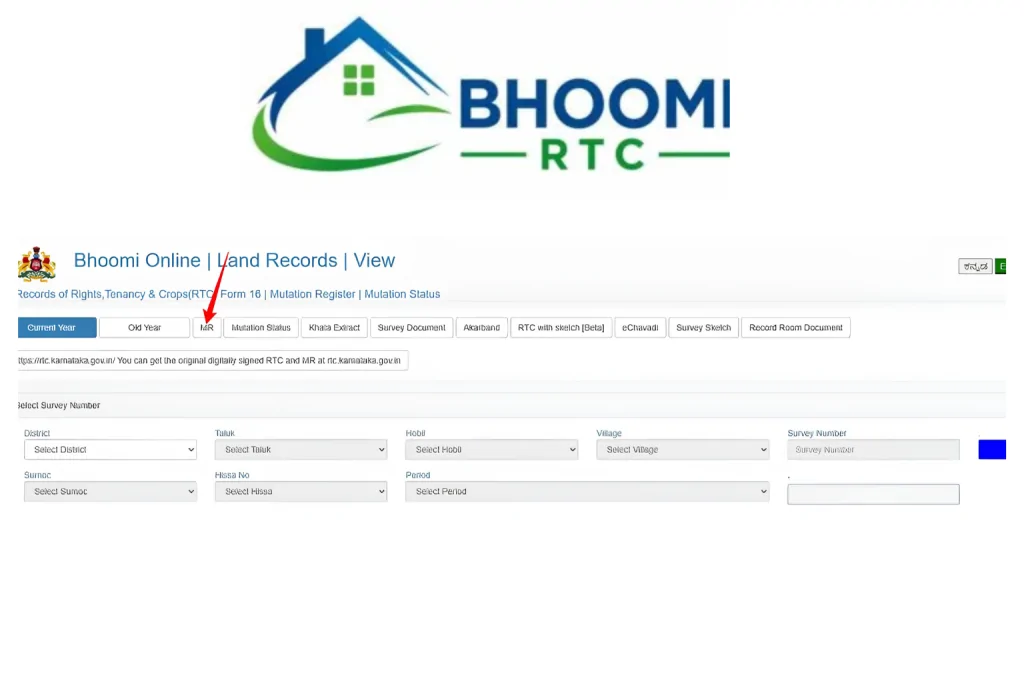
Go to the Reports Section
On the homepage, find and click on the Reports section ( in the top menu). Mutation history is available under Reports, not in the regular RTC search, not under the standard RTC services menu.
Select Bhoomi TRC Mutation History
Look for the option called Bhoomi RTC Mutation History then Click on it.
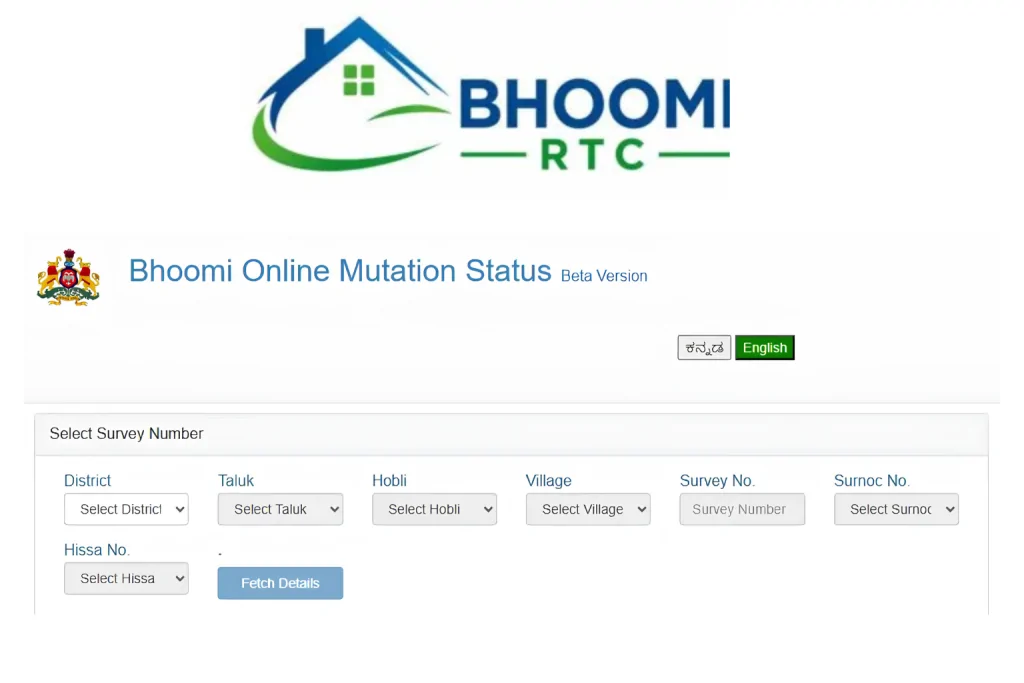
Enter the Required Land Details
You will need to fill in the following information:
District: Select the district where the land is located.
Taluka: Select the sub-district (Taluka).
Hobli: Select the Hobli (administrative subdivision of the Taluka).
Village: Enter the name of the village.
Survey Number: Provide the specific survey number of the land parcel.
Fetch and Review the Report
Click “Get Details” or “Go.” The portal will display the complete history of changes for this survey number. You can view each change for every property in order—from oldest to most recent. You can read it online, download it as a PDF, or print it out.
Stages of Mutation Approval on Bhoomi
The Mutation Process in Karnataka is done in three stages. Let’s discuss them in details:
VA Checklist Stage
First step of mutation: Village Accountant (VA) check sale deed, proof of identity (Aadhaar card, PAN card, voter ID, etc.) s, past income records, death certificate + legal heir certificate, certificate of responsibility. Before verifying with the VA, ensure that all documents are valid and complete.
RI Inspection Stage
The Next step after verification is Revenue Inspector (RI) physically visit land and match land boundaries according to given records.
Notice Period Stage
A 30-day notice period has been provided so that if anyone has any issue regarding the land, they can contact the patwari and express their concerns.
Tahsildar Final Approval
At the end Tehsildar reviews the whole file of inspection and results of notice period.If everything is in order, he approves the mutation and your name is updated in the revenue records (Pahani/RTC).
What If Your Mutation Is Stuck or Delayed?
How to Download the Mutation Extract (MR) for a Specific Transaction
Sometimes you need official document of Mutation,you can simply download Extract MR online from portal.Here are simple steps to follow for download:
Visit the Mutation Extract Page
First Open your browser and go to official landrecords.karnataka.gov.in for Mutation Extract
Enter Land Details
Fill in the following information:District,Taluk,Hobli,Village
and Survey Number
Click on “Get Details”
The system will show all transactions related to this survey number.
Select the specific amendment.
Select the exact amendment (transaction) you want from the list.
Preview and Download
Click on Preview to view the document.
You can then download it as a PDF or take a printout.
Important Points:
This is an officially certified Mutation Extract (MR).It costs only ₹15 per document.You need to pay through the portal’s i-Wallet (IRTC Wallet).For comparison, a regular RTC (Pehni) costs ₹10.
How to Check Mutation Status for a Pending Application
If you have applied for a mutation and want to know the current status of your application, you can easily check it online. Here is a simple guide:
Visit the Mutation Status Page
Go to web browser and Visit Official site of https://landrecords.karnataka.gov.in
Enter the Details
You need to enter these details to check application status District,Taluk,Hobli,Village and Survey Number
Click Submit
The portal will display the current status of your mutation application.
FAQ’s
Final Thoughts
The Bhoomi RTC Mutation History is one of the best tools to check ownership of land of Karnataka.In a simple report, it shows the complete story of the land — who owned it, when ownership changed, and the reasons behind each transfer.
Whether you’re buying land, taking out a loan, or inheriting property, always check the mutation history first. It takes less than five minutes, costs nothing to look at, and can save you from serious legal troubles and financial losses later. Check article on Dishaank APP


